
My app “Honee-Do”, a simple and free task sharing mobile application, has a ReactJS frontend (using Capacitor for single codebase maintenance) hosted in GCP’s Firebase and backend NodeJS/Express/MySQL stack living on an AWS Ubuntu EC2 instance with AWS RDS for database.
It works great overall – but as with any app, there are occasions when a bug in my code has caused the application to stop working correctly. In an enterprise environment with a robust dev/stg/prod deployment structure, such drastic bugs are often found long before reaching production. For a one-man shop like myself on a relatively simple app which doesn’t (yet) make me any money, I don’t have much of a dev environment beyond my local IDE – so drastic app-killing bugs are more likely. It doesn’t happen often but there have been times my app hasn’t worked for a day or two at at time after a deployment or major crash if I haven’t checked it.
Apart from building a more comprehensive development process, how else can we try to stay ahead of the curve on such problems? We need a solution that can tell us if our application is down so we at least know something is wrong. I took care of this by utilizing UptimeRobot’s free tier, which allows for simple HTTP-based health monitors via e-mail, SMS, and a few other options whenever your health checks fail.
While my focus on the app is mobile, I do maintain a web frontend for now until my Apple App store listing goes live (give iPhone users a way to use the app via browser in the meantime). I deployed a simple monitor right away sending GET requests to https://honee-do.com – sure enough, it came back green. Great start! Because the frontend is on GCP’s hosted Firebase service, there is very little I need to worry about apart from ensuring DNS records are correct – Google handles everything from underlying host management to SSL cert renewal, so the only factors under my direct control that could cause a problem are code issues, DNS, or possibly a Firebase configuration problem. At any rate – if something goes wrong with my web frontend, my health monitor will let me know within 5 minutes.

What about our backend? I’ve never had serious frontend or mobile app problems that were not caught in development, but the backend is another story and where things get a bit more tricky. I decided to stand up a dedicated healthcheck endpoint on the NodeJS deployment using a separate Express server listening on a separate port which would be restricted at the AWS Security Group layer to only IP addresses belonging to UpTimeRobot.
In my server.js constants, I first declared another express server (my additions to the existing code are marked in red):
const express = require("express");
const cors = require("cors");
const app = express();
const healthApp = express();
const fs = require('fs');
const https = require('https');
Then, I created a simple API endpoint which returns a code 200 OK message when successfully accessed:
healthApp.get('/health', (req, res) => {
  res.status(200).send('OK');
});
Finally, I stood up another instance of Express listening for healthApp on a different port:
const PORT = process.env.PORT || 443;
const HEALTH_PORT = process.env.PORT || 4431;
https.createServer(
    {
        key: fs.readFileSync('/etc/letsencrypt/live/api.honee-do.com/privkey.pem'),
        cert: fs.readFileSync('/etc/letsencrypt/live/api.honee-do.com/cert.pem'),
        ca: fs.readFileSync('/etc/letsencrypt/live/api.honee-do.com/chain.pem'),
    },
    app
).listen(PORT, () => {
        console.log('Listening...')
    });
  https.createServer(
      {
          key: fs.readFileSync('/etc/letsencrypt/live/api.honee-do.com/privkey.pem'),
          cert: fs.readFileSync('/etc/letsencrypt/live/api.honee-do.com/cert.pem'),
          ca: fs.readFileSync('/etc/letsencrypt/live/api.honee-do.com/chain.pem'),
      },
      healthApp
).listen(HEALTH_PORT, () => {
      console.log(`Heah check is running on HTTPS port ${HEALTH_PORT}.`);
    });
So now I have an SSL health check endpoint listening on port 4431. To secure the endpoint for traffic only from UpTimeRobot, I grabbed the list of UpTimeRobot public IPs and put those into security group rules in AWS:

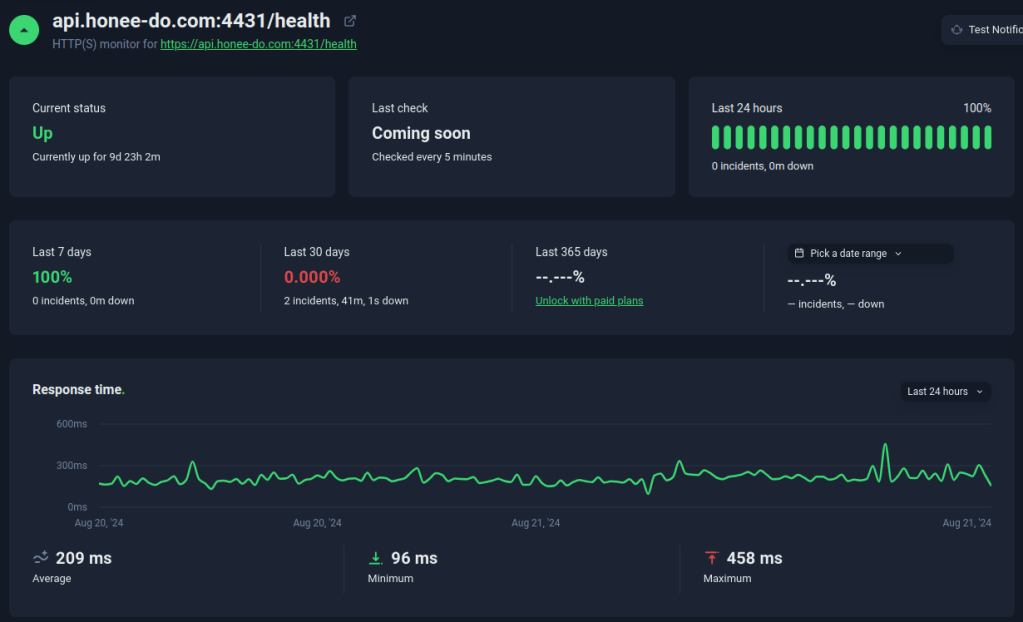
I set up UpTimeRobot to point to a healthcheck at my /health API endpoint and…. bingo! My health check worked without issue. Now if any host or Node server problems (crashed app, etc) cause the health check to fail, I will receive an e-mail letting me know.
There is a lot more we can do with effective health-checking – such as using endpoints which also query the database to validate DB health, or even actions utilizing synthetics to mimic typical usage and validate that the app should be working fine from the user perspective. As the app grows, I will definitely invest in more comprehensive monitoring – but this reasonably keeps me going for now.
If you’re in a similar bind with a simple web application, consider this solution and give UpTimeRobot a try.
Categories: Free Guides & Advice, Free Tools
 Austin Thomé - Cloud & DevOps Engineer